Fewer servers between your sensor and your pillow
By talking straight to Dexcom Share, LibreLinkUp, or your Nightscout URL, GlucScreen avoids third-party relay hiccups at 3 a.m.
Sugarmate by Tandem is a beloved companion on iOS for Dexcom and Tandem pump users, but Android users have dealt with rocky updates, cloud-relay sync pauses, and limited FreeStyle Libre support. GlucScreen is a native Android app purpose-built to turn any phone or tablet into a 24/7 OLED bedside or desk CGM monitor with direct LibreLinkUp, Dexcom Share, and Nightscout connectivity.
Direct Medtronic CareLink (MiniMed 770G/780G, Guardian & Simplera Sync) is also available today.
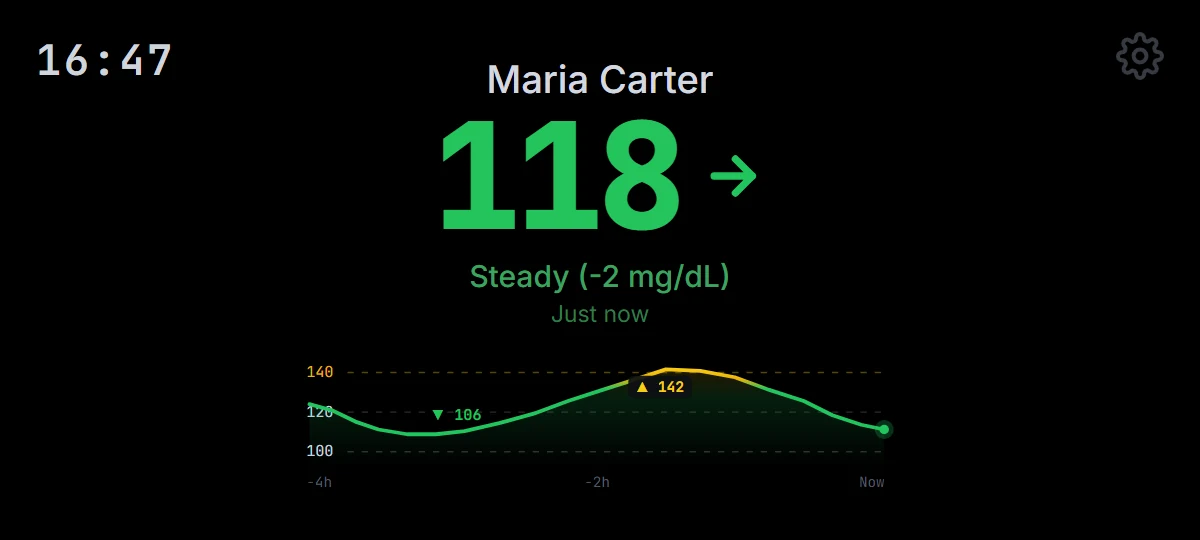
What changes when you want a rock-solid bedside or under-monitor glucose screen on Android.
| Feature | GlucScreen (Android) | Sugarmate (iOS / Web / Android) |
|---|---|---|
| Android reliability | Built natively from the ground up for both modern and older Android phones and tablets | Historically iOS/Apple Watch-first, with a rocky Android history of sync bugs and broken patches |
| CGM compatibility | LibreLinkUp (Libre 2/3), Dexcom Share (G6/G7/ONE+), Medtronic CareLink & Nightscout available today | Strong for Dexcom & Tandem Source; limited or high-friction support for FreeStyle Libre |
| Architecture & privacy | Direct connection from your phone to your official CGM cloud or Nightscout—zero GlucScreen relay servers | Depends on Sugarmate/Tandem cloud servers (users occasionally report "no new glucose values" freezes) |
| Bedside OLED night mode | Pure OLED black (#000000), dimmer below Android’s 5% minimum, anti-burn-in pixel shift, and pinch-to-scale giant digits | General dashboard UI without dedicated sub-5% OLED dimming or 24/7 burn-in protection |
| Family multi-patient view | Track up to 6 people simultaneously in split mosaic or carousel mixing Libre, Dexcom, and Nightscout | Centered on single-profile viewing |
| Compression-low alert & 8h card | Visual warning on atypical overnight pressure drops + exportable 8-hour TIR summary card | Not included |
By talking straight to Dexcom Share, LibreLinkUp, or your Nightscout URL, GlucScreen avoids third-party relay hiccups at 3 a.m.
Instead of keeping Sugarmate Web open in a browser window, prop your Android sideways under your monitor with GlucScreen for a distraction-free 4-hour curve.
No GlucScreen account creation, no ads, no tracking, and zero subscriptions.
Yes. Enable Share in the official Dexcom app with at least one invited follower, then sign into GlucScreen with the primary patient (Publisher) account.
Yes. GlucScreen’s multi-patient mode mixes up to 6 LibreLinkUp, Dexcom Share, and Nightscout profiles together in split-screen mosaic or carousel.
GlucScreen is built exclusively for Android phones and tablets—many iPhone users repurpose an old Android phone on their nightstand with GlucScreen.
SugarPixel & SugarPixel+ alternative
SugarPixel & SugarPixel+ alternative: a sharper OLED display you already own for $3.99
Gluclink & GlucyView alternative
Gluclink & GlucyView alternative: true OLED glucose monitor with real alarms for $3.99
MySugarDash & GlucoseDisplay alternative
MySugarDash & GlucoseDisplay alternative: turn any Android tablet or phone into a family CGM dashboard
SugarClock, Ulanzi & Tidbyt alternative
SugarClock, NSClock (Ulanzi TC001) & Tidbyt alternative: no firmware flashing, plus a real 4-hour chart
Glowcose & Glucose Projector alternative
Glowcose, Glucose Projector (Gluview) & Frixos alternative: nighttime clarity without lighting up the room
FreeStyle LibreLinkUp guide
Always-On OLED glucose display for FreeStyle Libre (LibreLinkUp)
Dexcom Share guide
Always-On OLED glucose display for Dexcom Share (G6, G7 & ONE+)
Medtronic CareLink guide
OLED nightstand display for Medtronic CareLink (MiniMed 780G & Guardian) with no Nightscout server
Nightscout OLED guide
Always-On OLED glucose display for Nightscout (Loop, AndroidAPS & xDrip+)
Repurpose an old Android
How to turn an old Android phone into a 24/7 nightstand CGM display
GlucScreen alternatives
GlucScreen alternatives: an honest comparison with other CGM display apps & hardware
Nighttime glucose alarm
Nighttime glucose alarm on Android: wake up on time without accidentally dismissing it
Repurpose an old tablet
How to turn an old Android tablet into a large family glucose display
CGM display under $5
Bedside glucose display under $5: save $95 to $280 without buying another gadget
MiGluvi alternative
MiGluvi (Gluvi) alternative: true OLED glucose monitor with real alarms for $3.99
Shuggah alternative (no subscription)
Shuggah alternative with no subscription: $3.99 one-time OLED glucose monitor on Android
Sweet Dreams alternative (Android)
Sweet Dreams alternative for Android: 24/7 OLED bedside glucose display with zero annual fees
Nightwatch Android replacement
Modern Nightwatch replacement for Android: built for current Nightscout servers and Android 14–16
Download GlucScreen on Google Play for a one-time $3.99 purchase and set it up in 60 seconds.
Technical support included: [email protected] · Support center →