Honest comparison · Every real option

GlucScreen alternatives: an honest comparison with other CGM display apps & hardware

If you are researching a GlucScreen alternative for bedside or desk glucose monitoring, there are three main paths: open-source DIY apps (xDrip+, Nightwatch, Juggluco), companion notification-bridge apps, and dedicated hardware screens (SugarPixel, Gluclink, MySugarDash). Here is a straightforward breakdown of when each option makes sense.

100% transparent guide Apps vs. hardware Official Google Play No subscriptions
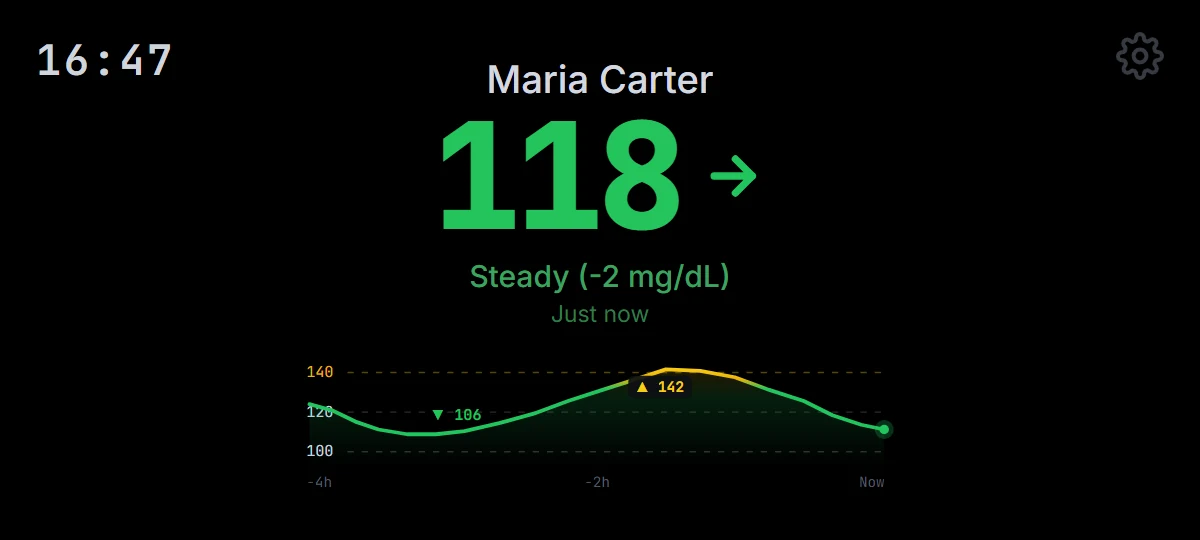
GlucScreen landscape OLED glucose display compared transparently against xDrip+, Nightwatch, SugarPixel, and Gluclink alternatives

GlucScreen vs. the main CGM display alternatives

How each option compares on setup time, privacy, overnight alarms, total cost, and everyday reliability.

Feature GlucScreen (Google Play) Alternatives (xDrip+, Nightwatch, bridge apps & hardware screens)
Setup time & simplicity 1–2 minutes from Google Play: connect LibreLinkUp, Dexcom Share, or directly paste your Nightscout URL xDrip+ and Nightwatch often require manual APK installs or technical tuning; physical displays require shipping wait times
Distribution & privacy Verified on Google Play Store. 100% direct connection to LibreLinkUp, Dexcom Share, or your Nightscout server—no middleman relays or notification scraping Many DIY apps are sideloaded APKs outside Play Store; some companion apps require permission to read your personal phone notifications
24/7 OLED night design Purpose-built Always-On pure OLED black (#000000) display with automatic pixel-shift burn-in care and giant readable digits General-purpose CGM apps are busy and brighter overnight; small 3.5" LCD hardware screens emit subtle gray backlight glow
Overnight alarms & safety Customizable low, high, and signal-loss sound alarms with SlideToConfirm, snooze, and visual compression-low warnings Nightwatch depends on Nightscout setup; dedicated screens like Gluclink do not include built-in sound alarms
Family mosaic & export Up to 6 people simultaneously in split-screen mosaic or carousel + 8-hour exportable summary card (TIR, average, curve) xDrip+/Juggluco target a single primary wearer; hardware units cap views (1–3 profiles) and do not export shareable cards
Total cost $3.99 one-time Google Play purchase valid across all your household Android phones and tablets $0 for DIY open-source apps (higher technical upkeep) or $99–$290 per physical unit for dedicated hardware
Advanced sensor ecosystems Supports FreeStyle Libre (LibreLinkUp), Dexcom (Share), Medtronic CareLink (MiniMed 770G/780G, Guardian), and Nightscout (Loop, Trio, AndroidAPS, xDrip+, Juggluco) today xDrip+ and DIY tools provide direct local Bluetooth sensor reading on the bedside phone

What to weigh before switching apps or buying hardware

Works with or without a Nightscout server

Don’t want to babysit a server? GlucScreen talks straight to LibreLinkUp, Dexcom Share, and Medtronic CareLink out of the box. Already running Nightscout for Loop, AndroidAPS, or xDrip+? Just paste your URL and connect natively.

If Google Play trust and privacy matter

Installing directly from Google Play avoids sideloading external APK files and never asks to read your personal status-bar notifications.

If your primary phone is an iPhone

While GlucScreen is Android-only today, many iPhone households (including Loop and Trio users) dust off an old Android phone or tablet for the nightstand—since it only needs Wi-Fi to read LibreLinkUp, Dexcom Share, or Nightscout.

GlucScreen alternatives FAQ

How does GlucScreen compare to xDrip+ or Nightwatch? +

xDrip+ is a phenomenal free tool for power users, but it requires sideloading APKs outside Google Play and complex setup; Nightwatch focuses strictly on Nightscout with a more technical UI. GlucScreen installs cleanly from Google Play, supports LibreLinkUp, Dexcom Share, and Nightscout in 2 minutes, and is purpose-built for dark bedrooms with pure OLED black, compression-low warnings, SlideToConfirm alarms, and 6-person family mosaic views.

Is there an iPhone or iPad alternative to GlucScreen? +

GlucScreen currently runs on Android phones and tablets only. Even if the sensor wearer uses an iPhone daily, any spare Android phone or tablet on home Wi-Fi can act as your dedicated GlucScreen bedside monitor via LibreLinkUp, Dexcom Share, or Nightscout.

Is dedicated hardware (SugarPixel, Gluclink) better than an old Android with GlucScreen? +

Dedicated hardware costs $99–$290 per room, shuts off immediately during a power outage, and in devices like Gluclink includes no sound alarms. A spare Android running GlucScreen gives you a larger, sharper OLED display, built-in battery backup, SlideToConfirm night alarms, and a single $3.99 license across multiple rooms.

Does GlucScreen support Nightscout and Medtronic CareLink? +

Yes—both are available natively today in GlucScreen. Connect directly to Medtronic CareLink (MiniMed 770G/780G, Guardian, and Simplera Sync) without running a server, or link your personal Nightscout site (Loop, Trio, AndroidAPS, xDrip+, Juggluco).

More GlucScreen guides & comparisons

SugarPixel & SugarPixel+ alternative

SugarPixel & SugarPixel+ alternative: a sharper OLED display you already own for $3.99

Gluclink & GlucyView alternative

Gluclink & GlucyView alternative: true OLED glucose monitor with real alarms for $3.99

MySugarDash & GlucoseDisplay alternative

MySugarDash & GlucoseDisplay alternative: turn any Android tablet or phone into a family CGM dashboard

SugarClock, Ulanzi & Tidbyt alternative

SugarClock, NSClock (Ulanzi TC001) & Tidbyt alternative: no firmware flashing, plus a real 4-hour chart

Glowcose & Glucose Projector alternative

Glowcose, Glucose Projector (Gluview) & Frixos alternative: nighttime clarity without lighting up the room

FreeStyle LibreLinkUp guide

Always-On OLED glucose display for FreeStyle Libre (LibreLinkUp)

Dexcom Share guide

Always-On OLED glucose display for Dexcom Share (G6, G7 & ONE+)

Medtronic CareLink guide

OLED nightstand display for Medtronic CareLink (MiniMed 780G & Guardian) with no Nightscout server

Nightscout OLED guide

Always-On OLED glucose display for Nightscout (Loop, AndroidAPS & xDrip+)

Repurpose an old Android

How to turn an old Android phone into a 24/7 nightstand CGM display

Nighttime glucose alarm

Nighttime glucose alarm on Android: wake up on time without accidentally dismissing it

Repurpose an old tablet

How to turn an old Android tablet into a large family glucose display

CGM display under $5

Bedside glucose display under $5: save $95 to $280 without buying another gadget

MiGluvi alternative

MiGluvi (Gluvi) alternative: true OLED glucose monitor with real alarms for $3.99

Sugarmate alternative (Android/Libre)

Sugarmate alternative for Android: direct, stable, and built for both FreeStyle Libre and Dexcom

Shuggah alternative (no subscription)

Shuggah alternative with no subscription: $3.99 one-time OLED glucose monitor on Android

Sweet Dreams alternative (Android)

Sweet Dreams alternative for Android: 24/7 OLED bedside glucose display with zero annual fees

Nightwatch Android replacement

Modern Nightwatch replacement for Android: built for current Nightscout servers and Android 14–16

See the difference on your nightstand in 2 minutes

Supports LibreLinkUp, Dexcom Share & Nightscout—no sideloaded APKs, direct email support included.

Technical support included: [email protected] · Support center →