Updated comparison · Spain & France CGM displays

Gluclink & GlucyView alternative: true OLED glucose monitor with real alarms for $3.99

Two independent European projects lead the desktop CGM screen niche: Gluclink (Spain, 3.5" LCD screens at €72–€99 plus a free Android beta app) and GlucyView (France, €128 Wi-Fi LED matrix). Before buying backlit LCD/LED hardware or relying on a notification-scraping beta app, see how GlucScreen delivers true OLED black below 5% brightness, real slide-to-dismiss night alarms, compression-low alerts, and up to 6 profiles on Google Play for a single $3.99 purchase.

Zero shipping wait Direct login (no QR bridge) Libre, Dexcom & Nightscout Up to 6 family profiles
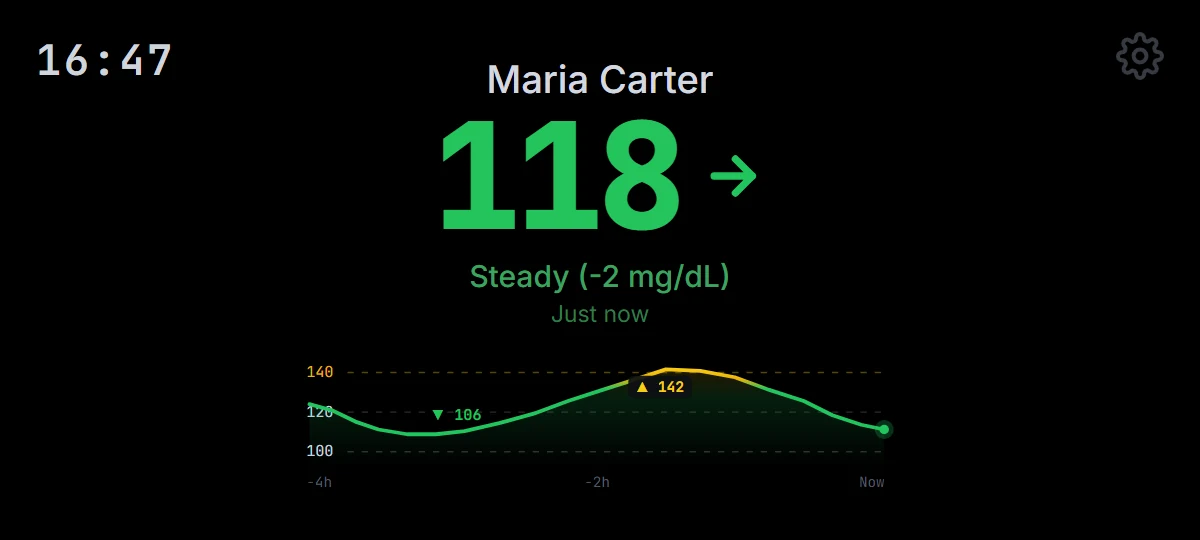
Android phone in landscape mode running GlucScreen in pure OLED black as an alternative to Gluclink and GlucyView physical displays

GlucScreen vs. Gluclink and GlucyView physical displays

How repurposing an Android compares on price, connection privacy, display clarity, and nighttime comfort.

Feature Your Android + GlucScreen Gluclink / GlucyView (hardware devices)
Total cost & hardware One-time Google Play buy ($3.99) using any Android phone or tablet you already own Gluclink (Spain): Lite €72 / Classic €99 (+ shipping; private Nightscout €39/yr). GlucyView (France): €128 + shipping
Multiple rooms, one price One single Google Play purchase ($3.99) lets you install it on several spare Android phones or tablets at home (nightstand, desk, living room, kitchen) under the same Google account You must buy a separate physical unit for each room (€198–€256 for just 2 rooms)
Full-screen Android app & permissions Stable, Google Play-verified app built solely as a 24/7 OLED bedside monitor—never reads your personal phone notifications Gluclink offers a free Android beta app with full-screen view powered by reading status-bar notifications; GlucyView has no dedicated OLED app
How it connects to your CGM 100% direct connection to LibreLinkUp, Dexcom Share, Medtronic CareLink, and Nightscout with zero relay servers Gluclink: notification bridge/QR or Nightscout; GlucyView: 2.4 GHz Wi-Fi via LibreLinkUp & Dexcom Share
Screen resolution & trend curve Razor-sharp OLED typography (5"–11") + smooth 4-hour trend chart with min/max markers and guide lines Compact 3.5-inch LCD touchscreen with 3-hour curve (Gluclink) or 32×8 LED dot matrix with limited chart space (GlucyView)
Pitch-black bedroom comfort True OLED black (unlit pixels emit zero room glare) with automatic 24/7 burn-in protection Backlit small LCD panels (emit subtle gray glow in dark rooms) or bright LED matrix dots
Smart night alarms & snooze Low, high, and signal-loss sound alarms with quiet hours, snooze (30/60/120 min), and slide-to-dismiss protection Gluclink does not emit sound alarms (visual display only; alerts remain solely on the official sensor phone)
Overnight power outage Keeps running for hours on the phone’s built-in battery and alerts you if the charger is disconnected No internal battery: if power goes out or the cable is unplugged, the screen shuts off immediately
Compression low alert Visual warning on sudden atypical overnight drops to remind you to verify with a fingerstick before treating (without silencing or delaying real alarms) Not available: displays only the raw sensor reading
8-hour exportable summary Visual summary card with Time in Range (TIR), average, and 8-hour curve ready to share via WhatsApp with family or doctors No reports or export; live screen readout only
Multi-patient family view Up to 6 people simultaneously in split-screen mosaic or automatic rotation Up to 3 profiles on Gluclink (or 1 active reading on compact LED matrices like GlucyView)

Related guides to help you decide

Why families across Europe and worldwide prefer GlucScreen

No notification-scraping bridge apps or third-party relays

Some external screens rely on a companion app reading status-bar notifications or syncing through a third-party web portal. GlucScreen connects directly to Abbott LibreLinkUp, Dexcom Share, or your own Nightscout server.

Ready for FreeStyle Libre 2, Libre 3, Dexcom ONE+ & Nightscout

Works out of the box with European (EU), UK, US, and international server regions for Abbott FreeStyle Libre and Dexcom—plus any personal Nightscout site.

Portable for travel, hotel nights, and office desks

Unlike a wired desktop clock that stops if unplugged, GlucScreen travels with you on any Android phone—and if the power goes out at home overnight, your phone keeps running on its built-in battery.

Gluclink, GlucyView & GlucScreen FAQ

Do I need to scan a QR code or install a bridge app on the patient’s phone? +

No. You do not need any secondary notification-forwarding app on the wearer’s phone. Simply connect directly inside GlucScreen using a LibreLinkUp follower account, the primary patient (Publisher) Dexcom account with Share enabled and at least one invited follower, or your Nightscout URL.

Does it work with European FreeStyle Libre 2/3 and Dexcom ONE+ accounts? +

Yes. Select Europe (EU) or International on the sign-in screen and connect directly to FreeStyle Libre 2, Libre 2 Plus, Libre 3, Dexcom G6, G7, or Dexcom ONE+.

Can I use it sideways under my computer monitor like a desk clock? +

Yes. Rotate your Android phone to landscape mode on a simple desk stand, pinch to scale the digits as large as you like, and keep your 4-hour trend curve right under your monitor.

How is GlucScreen different from a free companion bridge app or basic full-screen viewer? +

GlucScreen is purpose-built from the ground up as a 24/7 OLED bedside monitor and verified on Google Play Store—no sideloaded APK files and no permission to read your personal phone notifications. It also includes overnight safety features that passive viewers lack: sound alarms with slide-to-dismiss protection, visual compression-low warnings, stale-data strikethrough (>15 min), OLED burn-in protection, a 6-person family mosaic, and an 8-hour exportable summary card.

Are there any monthly subscription fees? +

None. GlucScreen is a one-time Google Play purchase with zero recurring fees and zero ads.

More GlucScreen guides & comparisons

SugarPixel & SugarPixel+ alternative

SugarPixel & SugarPixel+ alternative: a sharper OLED display you already own for $3.99

MySugarDash & GlucoseDisplay alternative

MySugarDash & GlucoseDisplay alternative: turn any Android tablet or phone into a family CGM dashboard

SugarClock, Ulanzi & Tidbyt alternative

SugarClock, NSClock (Ulanzi TC001) & Tidbyt alternative: no firmware flashing, plus a real 4-hour chart

Glowcose & Glucose Projector alternative

Glowcose, Glucose Projector (Gluview) & Frixos alternative: nighttime clarity without lighting up the room

FreeStyle LibreLinkUp guide

Always-On OLED glucose display for FreeStyle Libre (LibreLinkUp)

Dexcom Share guide

Always-On OLED glucose display for Dexcom Share (G6, G7 & ONE+)

Medtronic CareLink guide

OLED nightstand display for Medtronic CareLink (MiniMed 780G & Guardian) with no Nightscout server

Nightscout OLED guide

Always-On OLED glucose display for Nightscout (Loop, AndroidAPS & xDrip+)

Repurpose an old Android

How to turn an old Android phone into a 24/7 nightstand CGM display

GlucScreen alternatives

GlucScreen alternatives: an honest comparison with other CGM display apps & hardware

Nighttime glucose alarm

Nighttime glucose alarm on Android: wake up on time without accidentally dismissing it

Repurpose an old tablet

How to turn an old Android tablet into a large family glucose display

CGM display under $5

Bedside glucose display under $5: save $95 to $280 without buying another gadget

MiGluvi alternative

MiGluvi (Gluvi) alternative: true OLED glucose monitor with real alarms for $3.99

Sugarmate alternative (Android/Libre)

Sugarmate alternative for Android: direct, stable, and built for both FreeStyle Libre and Dexcom

Shuggah alternative (no subscription)

Shuggah alternative with no subscription: $3.99 one-time OLED glucose monitor on Android

Sweet Dreams alternative (Android)

Sweet Dreams alternative for Android: 24/7 OLED bedside glucose display with zero annual fees

Nightwatch Android replacement

Modern Nightwatch replacement for Android: built for current Nightscout servers and Android 14–16

Set up your desktop & nightstand CGM display in 60 seconds

No shipping wait, no QR bridges—just install GlucScreen on any Android device.

Technical support included: [email protected] · Support center →