Seeing the 4-hour curve changes everything
A single 3-digit number on an LED matrix doesn’t tell you whether you’ve been steady for three hours or just bounced off a sharp low. GlucScreen shows the full 4-hour curve right below your reading.
Many T1D tech fans build a budget glucose desk clock by flashing open-source firmware like SugarClock or NSClock (Nightscout Clock) onto a $50 Ulanzi TC001 smart pixel clock, or by configuring a retro Tidbyt display. Moreover, after Tidbyt’s acquisition put its original cloud at risk, owners had to migrate to Tronbyt—flashing firmware and self-hosting a server on Docker, Raspberry Pi, or Railway. If you have a spare Android phone, GlucScreen sets up in 60 seconds with zero self-hosted servers and a far sharper OLED display.
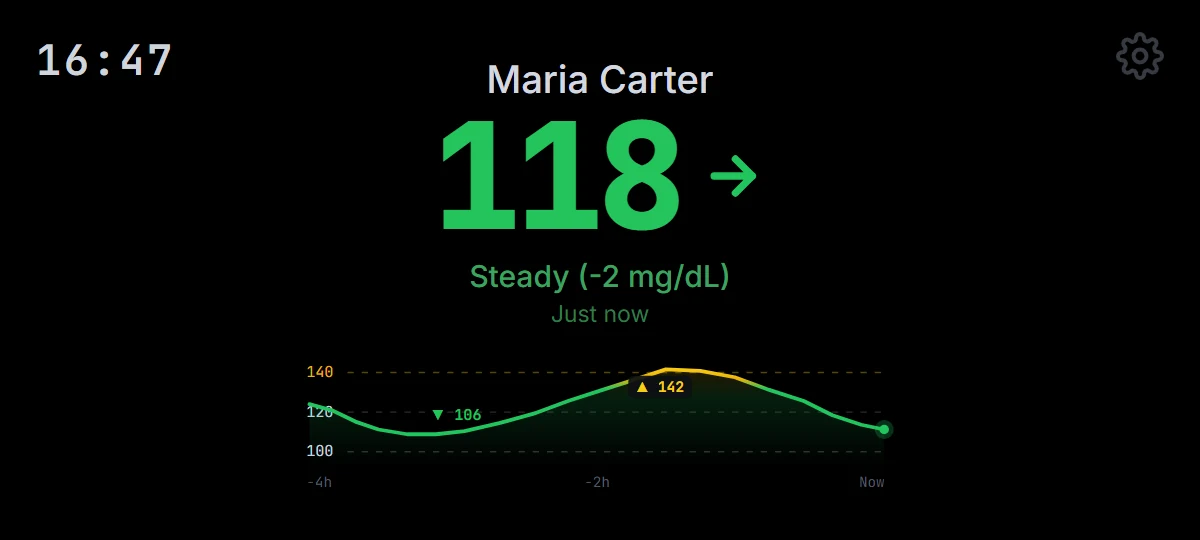
How a high-DPI OLED smartphone screen compares to a 32×8 retro LED dot matrix.
| Feature | Your Android + GlucScreen | Ulanzi TC001 (SugarClock / NSClock) / Tidbyt |
|---|---|---|
| Hardware cost | $0 on hardware (reusing an old Android) + tiny one-time Google Play purchase | $45 – $60 (Ulanzi TC001) or $180+ (Tidbyt) to buy the physical pixel clock |
| Setup complexity | Install from Google Play and connect LibreLinkUp, Dexcom Share, or your Nightscout URL (under 1 minute) | Plug into a computer via USB-C data cable, flash custom web firmware, and configure 2.4 GHz Wi-Fi portal |
| Resolution & historical graph | Millions of OLED pixels: ultra-crisp giant digits + smooth 4-hour trend curve with min/max guides | Only 256 LEDs total (32×8 grid): fits 3 blocky digits and a basic arrow, with no room for a detailed 4h chart |
| Bedroom brightness at 3 a.m. | Ultra-dim night mode on true OLED black; comfortable right next to your pillow | Individual RGB matrix LEDs can still feel harsh and bright in a pitch-black bedroom even at minimum brightness |
| Alarms & snooze controls | Full audio & vibration alarms, quiet hours, touch snooze (30/60/120 min), and slide-to-dismiss bar | Basic piezoelectric buzzer beeps with physical top buttons and no touchscreen snooze |
| Multi-patient family mode | Up to 6 people simultaneously in split mosaic or carousel with names and graphs | Can only fit one 3-digit number on the 32×8 matrix at a time |
A single 3-digit number on an LED matrix doesn’t tell you whether you’ve been steady for three hours or just bounced off a sharp low. GlucScreen shows the full 4-hour curve right below your reading.
ESP32-based pixel clocks like the Ulanzi TC001 only support 2.4 GHz Wi-Fi and often struggle with modern mesh routers. Your Android phone connects to any Wi-Fi network effortlessly.
While Tidbyt widgets and many DIY clocks force you to maintain a Nightscout URL, GlucScreen signs straight into LibreLinkUp or Dexcom Share—and if you already run Nightscout (Loop, AndroidAPS, xDrip+), it connects natively in seconds too.
Yes. GlucScreen displays a clean digital clock alongside your glucose value, trend arrow, delta change, and elapsed time—and you can toggle elements on or off in Settings.
It is completely optional. GlucScreen connects directly to your LibreLinkUp follower account (FreeStyle Libre 2/3) or the primary patient Dexcom account with Share enabled (G6, G7, ONE+) without needing a server—and if you already run Nightscout (Loop, Trio, AndroidAPS, xDrip+, Juggluco), GlucScreen supports it natively too.
Because OLED screens turn black pixels completely off, running GlucScreen at low night brightness draws only a couple of watts and stays cool 24/7.
Yes. Pinch directly on the screen to scale the digits as large as your phone or tablet allows, in both portrait and landscape orientations.
SugarPixel & SugarPixel+ alternative
SugarPixel & SugarPixel+ alternative: a sharper OLED display you already own for $3.99
Gluclink & GlucyView alternative
Gluclink & GlucyView alternative: true OLED glucose monitor with real alarms for $3.99
MySugarDash & GlucoseDisplay alternative
MySugarDash & GlucoseDisplay alternative: turn any Android tablet or phone into a family CGM dashboard
Glowcose & Glucose Projector alternative
Glowcose, Glucose Projector (Gluview) & Frixos alternative: nighttime clarity without lighting up the room
FreeStyle LibreLinkUp guide
Always-On OLED glucose display for FreeStyle Libre (LibreLinkUp)
Dexcom Share guide
Always-On OLED glucose display for Dexcom Share (G6, G7 & ONE+)
Medtronic CareLink guide
OLED nightstand display for Medtronic CareLink (MiniMed 780G & Guardian) with no Nightscout server
Nightscout OLED guide
Always-On OLED glucose display for Nightscout (Loop, AndroidAPS & xDrip+)
Repurpose an old Android
How to turn an old Android phone into a 24/7 nightstand CGM display
GlucScreen alternatives
GlucScreen alternatives: an honest comparison with other CGM display apps & hardware
Nighttime glucose alarm
Nighttime glucose alarm on Android: wake up on time without accidentally dismissing it
Repurpose an old tablet
How to turn an old Android tablet into a large family glucose display
CGM display under $5
Bedside glucose display under $5: save $95 to $280 without buying another gadget
MiGluvi alternative
MiGluvi (Gluvi) alternative: true OLED glucose monitor with real alarms for $3.99
Sugarmate alternative (Android/Libre)
Sugarmate alternative for Android: direct, stable, and built for both FreeStyle Libre and Dexcom
Shuggah alternative (no subscription)
Shuggah alternative with no subscription: $3.99 one-time OLED glucose monitor on Android
Sweet Dreams alternative (Android)
Sweet Dreams alternative for Android: 24/7 OLED bedside glucose display with zero annual fees
Nightwatch Android replacement
Modern Nightwatch replacement for Android: built for current Nightscout servers and Android 14–16
Turn any spare Android phone into your 24/7 OLED glucose clock and 4-hour monitor in under a minute.
Technical support included: [email protected] · Support center →