Readable from across the kitchen or couch
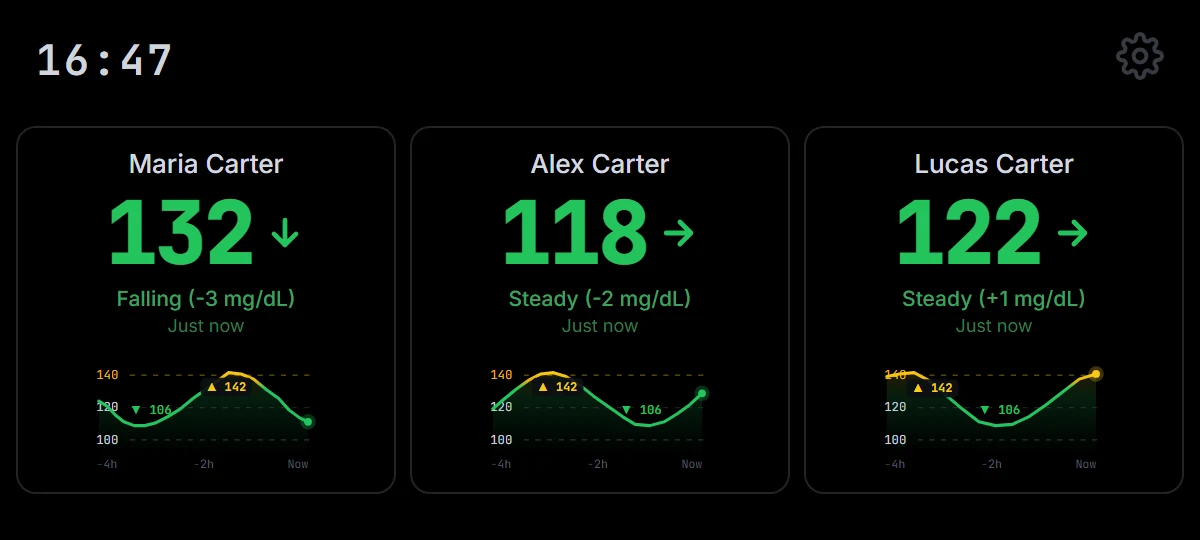
Tiny 3.5" screens force you to walk over to read trend graphs. On an 8"–11" tablet, digits, arrows, and 4-hour curves are unmistakable from across the room without glasses.
Have a spare Android tablet sitting in a drawer (Samsung Galaxy Tab, Lenovo, Xiaomi Pad, Huawei)? Instead of spending $170–$290 on a 7"–8" Wi-Fi monitor or $99 on a tiny 3.5" LCD gadget, turn your tablet into a crystal-clear living room, kitchen, or bedside glucose dashboard in under 3 minutes.
No SIM card, Bluetooth, or NFC needed—just home Wi-Fi and a simple tabletop stand.
Silence social or email notifications on the spare tablet, connect it to Wi-Fi, and enable screen rotation so GlucScreen fills the full landscape width.
One single Google Play purchase covers both your kitchen tablet and a spare bedside phone signed into the same Google account—no extra licenses required.
Connect directly to LibreLinkUp, Dexcom Share, or Nightscout. For multi-T1D households, enable mosaic mode to view every family member’s current reading and 4-hour trend curve simultaneously.
Pinch to zoom the glucose digits until they are effortless to read from across the room, set GlucScreen battery usage to Unrestricted in Android Settings, and prop it on a charging stand.
Tiny 3.5" screens force you to walk over to read trend graphs. On an 8"–11" tablet, digits, arrows, and 4-hour curves are unmistakable from across the room without glasses.
Leave a tablet on the kitchen counter or at grandparents’ house so everyone can check a child’s school-day readings at a glance without unlocking phones.
Unplug the tablet when moving from the kitchen to the living room or bedroom—it keeps updating seamlessly for hours on internal battery.
Yes. GlucScreen runs smoothly on both LCD and OLED tablets. The high-contrast black interface minimizes glare even on LCD panels when dimmed for evening use.
Yes. Because GlucScreen is a one-time Google Play purchase tied to your Google account, you can install it across multiple household Android phones and tablets at no extra cost.
No. The sensor stays paired with the wearer’s everyday smartphone; the tablet simply reads live updates over Wi-Fi from LibreLinkUp, Dexcom Share, or Nightscout.
Up to 6 people simultaneously in split-screen mosaic or automatic rotation—even mixing FreeStyle LibreLinkUp, Dexcom Share, and Nightscout profiles on the same screen.
SugarPixel & SugarPixel+ alternative
SugarPixel & SugarPixel+ alternative: a sharper OLED display you already own for $3.99
Gluclink & GlucyView alternative
Gluclink & GlucyView alternative: true OLED glucose monitor with real alarms for $3.99
MySugarDash & GlucoseDisplay alternative
MySugarDash & GlucoseDisplay alternative: turn any Android tablet or phone into a family CGM dashboard
SugarClock, Ulanzi & Tidbyt alternative
SugarClock, NSClock (Ulanzi TC001) & Tidbyt alternative: no firmware flashing, plus a real 4-hour chart
Glowcose & Glucose Projector alternative
Glowcose, Glucose Projector (Gluview) & Frixos alternative: nighttime clarity without lighting up the room
FreeStyle LibreLinkUp guide
Always-On OLED glucose display for FreeStyle Libre (LibreLinkUp)
Dexcom Share guide
Always-On OLED glucose display for Dexcom Share (G6, G7 & ONE+)
Medtronic CareLink guide
OLED nightstand display for Medtronic CareLink (MiniMed 780G & Guardian) with no Nightscout server
Nightscout OLED guide
Always-On OLED glucose display for Nightscout (Loop, AndroidAPS & xDrip+)
Repurpose an old Android
How to turn an old Android phone into a 24/7 nightstand CGM display
GlucScreen alternatives
GlucScreen alternatives: an honest comparison with other CGM display apps & hardware
Nighttime glucose alarm
Nighttime glucose alarm on Android: wake up on time without accidentally dismissing it
CGM display under $5
Bedside glucose display under $5: save $95 to $280 without buying another gadget
MiGluvi alternative
MiGluvi (Gluvi) alternative: true OLED glucose monitor with real alarms for $3.99
Sugarmate alternative (Android/Libre)
Sugarmate alternative for Android: direct, stable, and built for both FreeStyle Libre and Dexcom
Shuggah alternative (no subscription)
Shuggah alternative with no subscription: $3.99 one-time OLED glucose monitor on Android
Sweet Dreams alternative (Android)
Sweet Dreams alternative for Android: 24/7 OLED bedside glucose display with zero annual fees
Nightwatch Android replacement
Modern Nightwatch replacement for Android: built for current Nightscout servers and Android 14–16
Build an 8"–11" family glucose dashboard in 3 minutes without spending $100–$250 on new hardware.
Technical support included: [email protected] · Support center →