Dexcom ONE+ supports Share natively; original ONE did not
Built on the G7 platform, Dexcom ONE+ includes native Dexcom Share/Follow and works directly with GlucScreen. The older first-generation Dexcom ONE did not include native Share.
View live readings from Dexcom G6, Dexcom G7, or Dexcom ONE+ on a pitch-black OLED screen beside your bed or under your computer monitor, connected directly via Dexcom Share using the primary patient (Publisher) account.
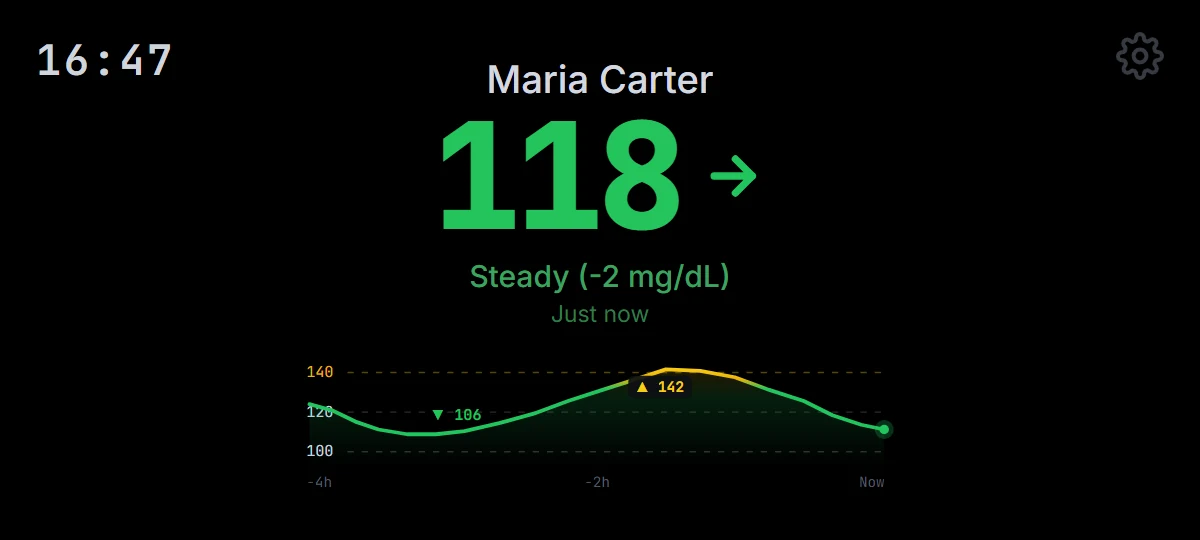
Supports both US and international (Europe, UK, Canada, LATAM, APAC) Dexcom Share regions.
In the official Dexcom G6, G7, or Dexcom ONE+ app, open Connections → Share and make sure sharing is enabled with at least one invited follower so cloud uploads stay active.
Choose Dexcom Share on the GlucScreen login screen, select United States or International (outside US) to match your account, and sign in with the primary patient (Publisher) Dexcom account (not a Dexcom Follow account).
Pinch to resize digits for easy viewing without glasses, choose mg/dL or mmol/L, and enable slide-to-dismiss night alarms so you never silence an alert while half asleep.
Built on the G7 platform, Dexcom ONE+ includes native Dexcom Share/Follow and works directly with GlucScreen. The older first-generation Dexcom ONE did not include native Share.
Dexcom only streams data to its Share cloud when Share is turned on with at least one follower configured inside the official Dexcom app.
US Dexcom accounts use a separate server from accounts outside the US. If login fails, verify that the region selector matches where your account was created.
Sign in with the primary patient (Publisher) Dexcom account —the same one used in the official Dexcom app— with Share turned on and at least one invited follower. Unlike LibreLinkUp (which uses a follower account), Dexcom Share does not sign in with a Dexcom Follow account.
Yes. Dexcom G6, Dexcom G7, and Dexcom ONE+ all use Dexcom Share and work seamlessly in both US and international regions.
Yes. Multi-patient mode lets you mix providers and monitor up to 6 people simultaneously in split-screen mosaic or automatic cycling mode.
Yes. Switch between mg/dL and mmol/L anytime in Settings; thresholds and alerts adapt automatically.
No. GlucScreen is a secondary convenience display for continuous visibility. Always rely on your official Dexcom app or receiver for medical treatment decisions.
SugarPixel & SugarPixel+ alternative
SugarPixel & SugarPixel+ alternative: a sharper OLED display you already own for $3.99
Gluclink & GlucyView alternative
Gluclink & GlucyView alternative: true OLED glucose monitor with real alarms for $3.99
MySugarDash & GlucoseDisplay alternative
MySugarDash & GlucoseDisplay alternative: turn any Android tablet or phone into a family CGM dashboard
SugarClock, Ulanzi & Tidbyt alternative
SugarClock, NSClock (Ulanzi TC001) & Tidbyt alternative: no firmware flashing, plus a real 4-hour chart
Glowcose & Glucose Projector alternative
Glowcose, Glucose Projector (Gluview) & Frixos alternative: nighttime clarity without lighting up the room
FreeStyle LibreLinkUp guide
Always-On OLED glucose display for FreeStyle Libre (LibreLinkUp)
Medtronic CareLink guide
OLED nightstand display for Medtronic CareLink (MiniMed 780G & Guardian) with no Nightscout server
Nightscout OLED guide
Always-On OLED glucose display for Nightscout (Loop, AndroidAPS & xDrip+)
Repurpose an old Android
How to turn an old Android phone into a 24/7 nightstand CGM display
GlucScreen alternatives
GlucScreen alternatives: an honest comparison with other CGM display apps & hardware
Nighttime glucose alarm
Nighttime glucose alarm on Android: wake up on time without accidentally dismissing it
Repurpose an old tablet
How to turn an old Android tablet into a large family glucose display
CGM display under $5
Bedside glucose display under $5: save $95 to $280 without buying another gadget
MiGluvi alternative
MiGluvi (Gluvi) alternative: true OLED glucose monitor with real alarms for $3.99
Sugarmate alternative (Android/Libre)
Sugarmate alternative for Android: direct, stable, and built for both FreeStyle Libre and Dexcom
Shuggah alternative (no subscription)
Shuggah alternative with no subscription: $3.99 one-time OLED glucose monitor on Android
Sweet Dreams alternative (Android)
Sweet Dreams alternative for Android: 24/7 OLED bedside glucose display with zero annual fees
Nightwatch Android replacement
Modern Nightwatch replacement for Android: built for current Nightscout servers and Android 14–16
One-time purchase on Google Play—connected to Dexcom Share in under a minute.
Technical support included: [email protected] · Support center →