Special offer · Free on Google Play until November 25

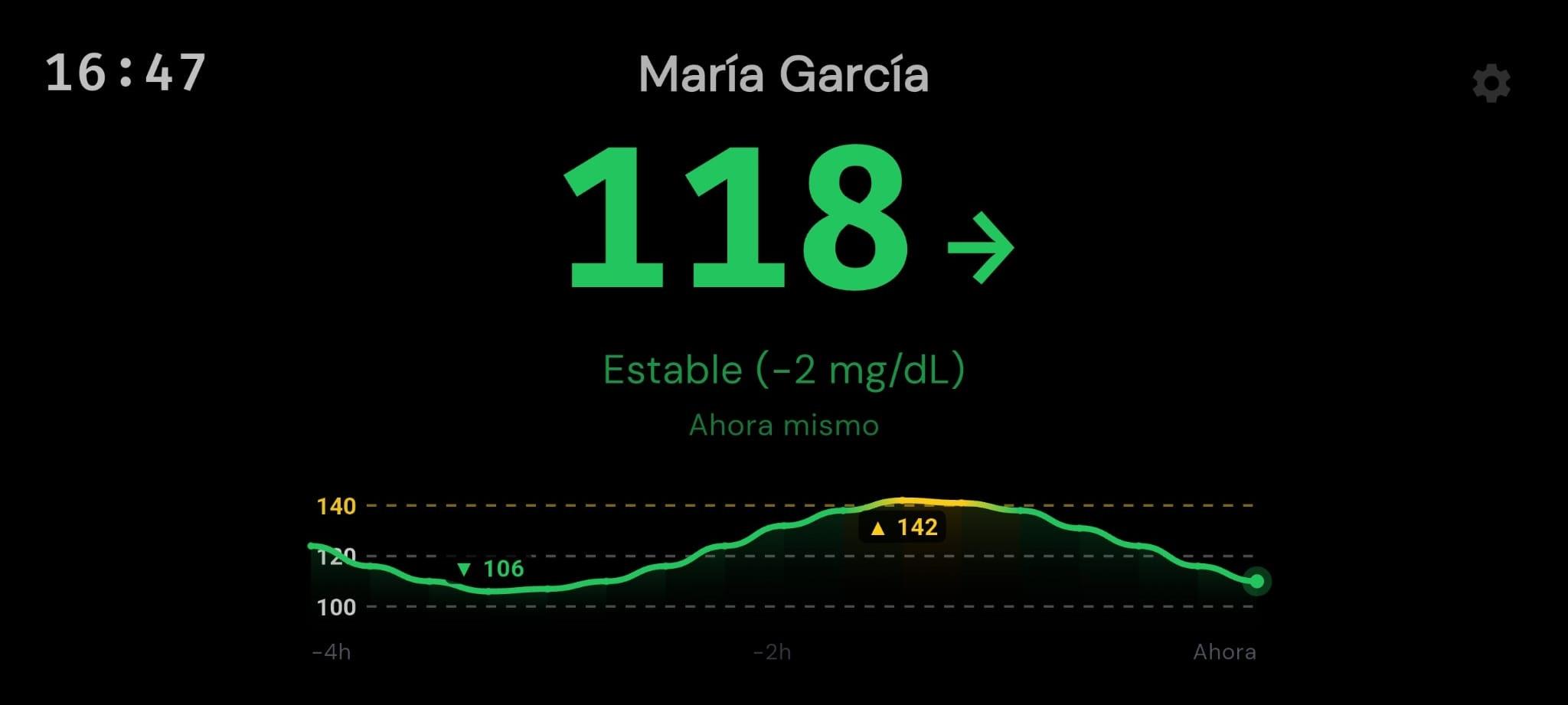
Your glucose always in sight Hands-free

Turn any Android phone or tablet into a continuous glucose monitor for your nightstand or desk, compatible with FreeStyle Libre and Dexcom. Open one eye at 3 a.m., see that everything is fine, and go right back to sleep.

Download it free until November 25 and keep it forever (no subscriptions).

One-time purchase

Buy once, yours forever

Zero harsh light

Pure black that respects your sleep

Libre & Dexcom

Set up in under 1 minute

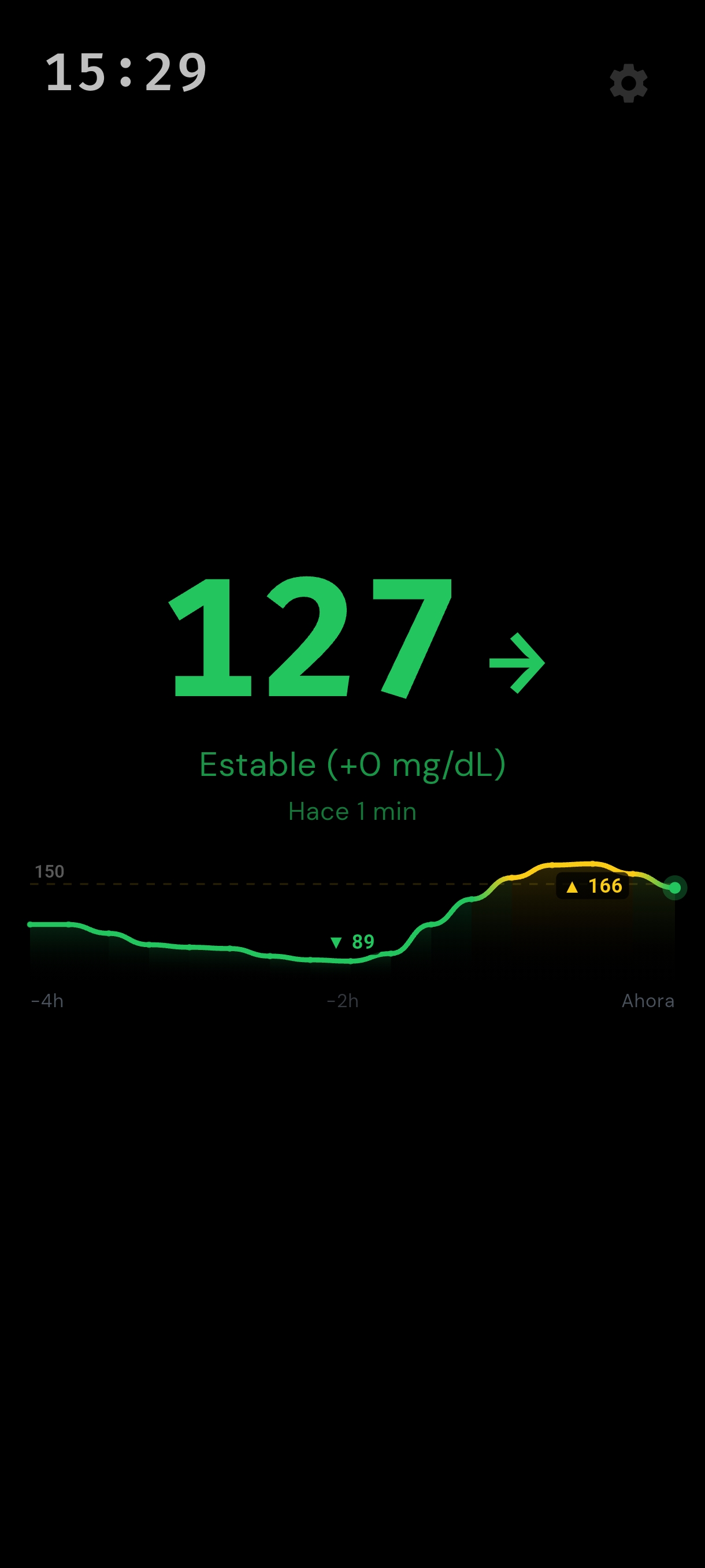
Real GlucScreen screenshot on Android showing continuous glucose level, trend arrow, and graph

Tap to rotate the phone and see how it looks on your nightstand or desk.

$0

on new hardware

Reuse any Android phone or tablet you already have at home.

One-time

no fees or ads

Buy it once on Google Play and use it forever.

100%

direct & private

Direct connection to your official account, no middlemen.

24/7

screen protection

Pure black background that protects your sleep and display.

Save from day one

Don’t buy another expensive device. You already have a better screen in a drawer.

Dedicated bedside CGM displays often cost between $150 and $290, have low-resolution screens, and lock you into yet another gadget. An older phone with an OLED display is far sharper and blends into your bedroom without lighting up the room.

Dedicated monitors

$150 – $290

Proprietary hardware, small screens, and limited customization.

Your phone + GlucScreen

$0 on hardware

Put your existing phone to work with a crisp, silent display.

Transparent pricing Free until Nov 25

One-time purchase. Yours forever.

No monthly subscriptions, no ads, and no locked features. Download it once on Google Play.

  • Nightstand portrait mode and landscape desk mode
  • Track up to 6 family members at once in split screen or carousel
  • Smart sound alerts for lows, highs, or missing data
  • 4-hour trend graph with your own color thresholds
  • Support for mg/dL & mmol/L plus all future updates included
Your health data travels directly from your sensor to your phone. View on Google Play →
Built for everyday life

From your nightstand to your desk. Always with you.

Every detail in GlucScreen is designed around real moments: sleeping soundly at night, staying focused during the day, or keeping an eye on the people you love.

At night · On the nightstand

Open one eye at night and go right back to sleep.

Whether you live with diabetes or care for a child or partner, no more fumbling for your phone and getting blinded by a bright screen. Just glance at your nightstand in total darkness: read the large number from your pillow, check the trend, and rest easy.

And if levels go too low or too high, the night alarm wakes you right away.

03:42 Nightstand · Pitch black
118 →

Steady (-1 mg/dL) · 1 min ago
During the day · Work & study

Your trend right under your monitor, without breaking focus.

Place an spare phone horizontally right below your computer screen. In the middle of a meeting, studying, or reading, a half-second glance is all it takes to see where your glucose is heading and how it moved over the last 4 hours.

No unlocking your phone, no switching apps, and no distractions.

Your work or study display
11:30 131 →
For families · Multiple people at once

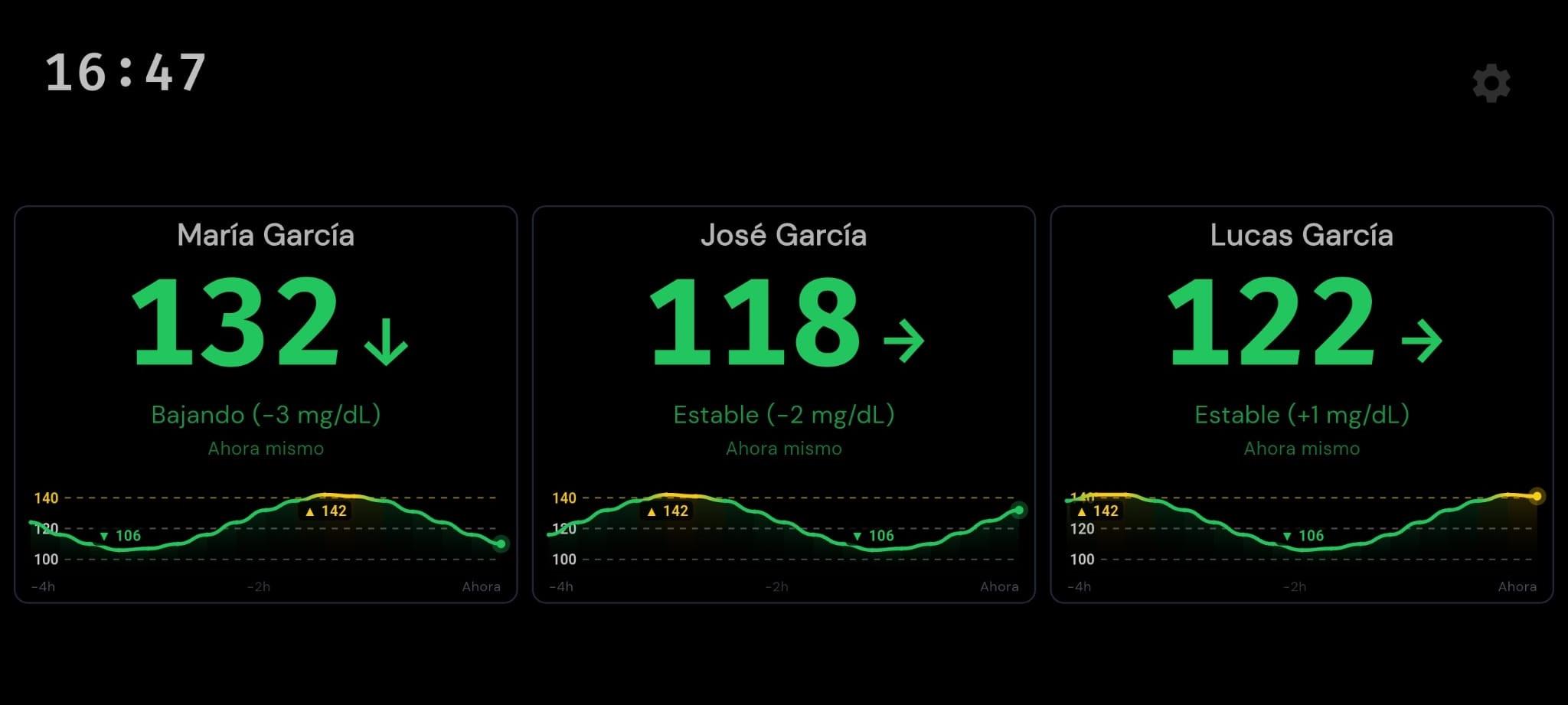
The whole family on one screen, without switching accounts.

Caring for two kids with diabetes or keeping an eye on your parents too? Add multiple accounts and choose how to view them: all together in split screen (up to 6 people) or cycling automatically every few seconds.

Works whether you’re in the same house or your child is at school or traveling.

08:16 Mosaic view · 3 profiles

Maria

132↓

-3 mg/dL

Alex

118→

-2 mg/dL

Lucas

154↗

+6 mg/dL

Inside the app

Real screenshots. No clutter, no hidden menus.

Pick a screen to see exactly how GlucScreen looks on your phone or tablet, in both portrait and landscape.

GlucScreen — Giant, crystal-clear numbers on pure black

01 · Main reading (Portrait view)

Thoughtful down to the last detail

Simple at a glance. Smart when it matters.

Try out its night-screen protection, 4-hour trend chart, and alarms designed so you never dismiss them by accident.

Night mode & screen care

Won’t light up your bedroom. Protects your screen 24/7.

By using true black, the screen draws minimal power and won’t disturb your sleep. Numbers also shift imperceptibly by a few pixels every few minutes to prevent burn-in, even if the phone stays on for months.

Traditional app

118 →

Lights up the whole room

GlucScreen

118 →

Room stays 100% dark

Last 4 hours

Clear trend with your own color zones

See your min, max, and direction at a glance, with guide lines and custom colors for normal, high, very high, and low.

150 ▼ 89 ▲ 166 -4h -2h Now
Smart night alerts

Alerts that wake you up — and won’t turn off by mistake.

Enable urgent low, high, or prolonged signal-loss alerts with sound, vibration, and quiet-hours schedules. Turning an alarm off requires sliding to the end, or you can snooze for 30, 60, or 120 minutes.

Low glucose · 65 mg/dL

Try sliding the bar to the right to dismiss (or snooze below)

Drop-out safety

Never trust an outdated reading

If Wi-Fi drops or more than 15 minutes pass without new data, the reading is immediately struck through and dimmed. It also warns you if the phone is unplugged and battery runs low.

After 15 min offline

118 →

No recent data (>15 min)
Instant customization

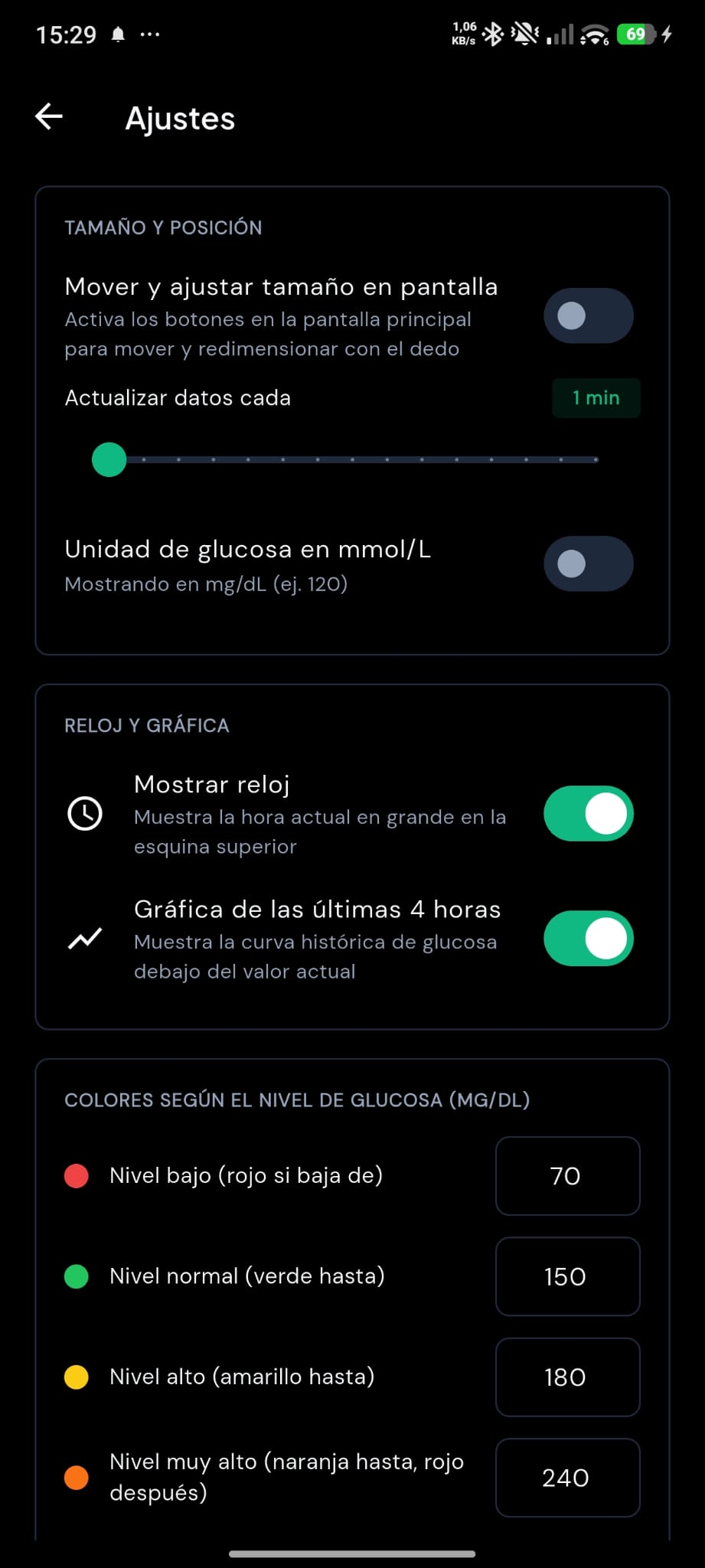
Drag and resize numbers with your fingers. Choose mg/dL or mmol/L.

Make the number as large as you need to read it without glasses from across the bed, in both portrait and landscape. Switch units in one tap and choose whether to show the clock or graph.

Sample reading

126 mg/dL

Compatibility

Works with your sensor from minute one

No extra hardware or complicated steps. If you already follow your glucose on your phone, GlucScreen is ready for you.

Logo of FreeStyle Libre

Abbott

FreeStyle Libre

Available today
FreeStyle Libre 2 Libre 2 Plus FreeStyle Libre 3

Connect in seconds with your free LibreLinkUp account, the official companion app used by patients and caregivers.

US, Europe, UK, Latin America, and worldwide

Logo of Dexcom Share

Dexcom

Dexcom Share

Available today
Dexcom G6 Dexcom G7 Dexcom ONE

Sign in directly with your Dexcom Share follower credentials and receive every reading continuously, day and night.

Compatible with US and international regions

Upcoming sensors on the roadmap

Request support for my sensor ↓
Logo of Medtronic CareLink

Medtronic CareLink

Coming soon

For MiniMed pump users (770G / 780G) and Guardian sensors.

Logo of Nightscout

Nightscout

In progress

Direct access for users who already run a personal Nightscout site.

+

Eversense & Sibionics

Based on demand

We prioritize new integrations based on the requests we receive.

Using another sensor?

Notify me as soon as it’s supported

We prioritize new integrations based on what you ask for most. Leave your email and we’ll send you a single message when your sensor is ready.

Got questions?

Frequently asked questions

Everything you need to know before turning any Android device into your glucose monitor.

What do I need to start using GlucScreen? +

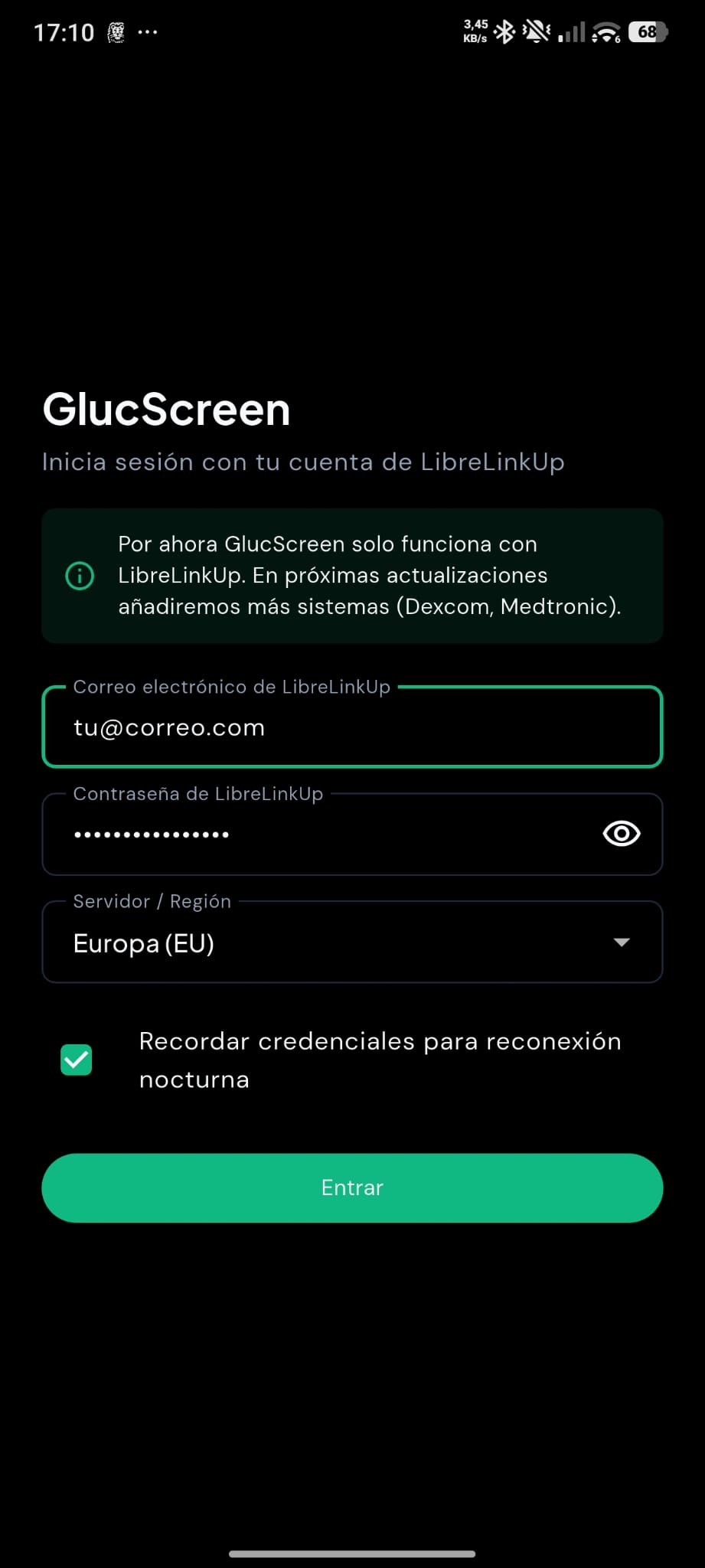
Just an Android phone or tablet connected to Wi-Fi and the follower account you already use for your sensor (LibreLinkUp for FreeStyle Libre, or Dexcom Share). In under a minute you’ll see your readings on the big screen.

How does pricing work? Are there monthly fees? +

There are no monthly subscriptions or hidden fees. You download GlucScreen on Google Play with a one-time purchase and the app is yours forever, with all features included.

Will leaving the screen on all night damage my phone? +

No. GlucScreen keeps the background pure black so only the numbers light up, and imperceptibly shifts the layout every few minutes to protect OLED panels over the long term.

Does it drain the battery or overheat the phone? +

Because only the numbers are lit on a pure black background, power draw is very low. Still, for 24/7 bedside or desk use, we recommend keeping the phone on a stand plugged into its charger.

Does it work in both portrait and landscape? +

Yes. You can stand the phone upright or lay it sideways, and customize the position and size of the numbers independently for each orientation by dragging or pinching on the screen.

Can I see my child’s or family member’s glucose when we’re not in the same house? +

Yes. Because GlucScreen connects over the internet to your official follower account, you can keep the monitor on your nightstand or at work and see their glucose in real time while they’re at school, traveling, or in another city. You can also view up to 6 people at once in mosaic mode.

Who can see my health data or password? +

Only you. Your phone communicates directly with your sensor’s official cloud (Abbott or Dexcom). We have no middleman servers, we don’t collect readings, and we never store your passwords.

Does it replace my sensor’s official app? +

No. GlucScreen is a secondary companion display designed for convenience and continuous visibility day and night. Always check your official sensor app or receiver before making any medical or treatment decisions.

Personal support

Have a question or a feature idea?

We improve GlucScreen every day by listening to people with diabetes, parents, and caregivers. Tell us what you need and we’ll reply personally.

Direct email support:

[email protected]
Message topic

Your email is only used to reply to your message.

GlucScreen
Active offer until November 25 · Free on Google Play

Sleep easier starting tonight

Download GlucScreen on Google Play in under a minute, place your phone on the nightstand, and keep your glucose always in sight. Free for a limited time, yours forever.

Free until November 25 · One-time purchase on Google Play · No subscriptions or ads · Made for Android